September 29, 201015 yr How is the fit on the rear wheel arches and rocker panels from rustrepair.com? Do any of you have the part number or a switchover number for the brushes on the original denso starter on a 5mt fwd Loyale?
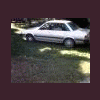
September 29, 201015 yr I have used the rear wheel arches and rocker panels on my 82 wagon! With a little cutting, a lot of welding, some filler and paint I think they fit pretty well! Much better than making your own (which I have also done) And the prices are pretty good as well. Here's the best pic I have of the work I did ( I used the Loyale rocker panels )
October 1, 201015 yr The only issue I really had was I had to make a panel that goes form the back side of the rocker to the floor because that was missing as well. also you may have to remove the doors and fenders to make them properly fit. Also make sure your doors shut well before they are attached to the car because I have a little issue with one of the doors shutting hard. Even though it's a lot of work, it is well worth it, It's sooo much better than making your own. In fact i just ordered another set of the rockers they offer to put on my 84!!!

Please sign in to comment
You will be able to leave a comment after signing in
Sign In Now