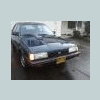
April 30, 201114 yr My buddy isnt on this forum yet, not sure if he will be since he goes through me for parts and service... But I took some pics and here are some specs. 1997 Impreza L Sedan 5 Speed EJ22T shortblock w/ non-turbo heads (for now) 60k miles AWD Legacy GT wheels Borla exhaust Hella fog lights w/ 4100k HID bulbs Regular fogs have 4300k HID bulbs Headlights are 6000k HID bulbs RS hood Rear disc conversion Im sure theres some other things lol, but this is just what I remember... Now for the pics: I know the plans are at least to get EJ25D heads and drill the oil return hole or w/e and Turbo it. Different front bumper (this ones kinda screwed up) Tomorrow GD and I will be doing Driver tie-rod and Passenger wheel bearing. On a side note, apparently my scoob is not a real scoob (1986 GL Sedan) because when I throw the dueces up to Imps/Loyales/Brats/Legacy/WRX/STI etc I never get them back. Driving the Impreza around Im constantly having to quickly throw up the dueces as people pass me because theyre doing it to me... Poor Ned. Name of this one: Lu.
April 30, 201114 yr Author http://s1014.photobucket.com/albums/af262/Rugby_boy101/?action=view¤t=DSCN1227.mp4 Video of the exhaust sound, I couldnt go THAT loud in my driveway

Please sign in to comment
You will be able to leave a comment after signing in
Sign In Now