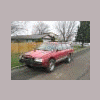
April 3, 201213 yr Hey, So I've got mine running and the neighbor thought mine was cool, so he went out and procured himself a Loyale (90 ish wagon with manual 5spd pb 4x4) We got the timing belts on last night and we went to start it and BAM...nothing. I noticed that the fuel pump relay does not click when the key turns to on and obviously, the pump does not kick on either. I am assuming I would start at the relay and work my way back to the pump, correct? Where do I find this relay though? By the way, the car started right up when we poured gas down the intake.
April 3, 201213 yr The first thing to check is the fusible links and the fuses if you haven't done that already. The fusible links are in a plastic box mounted on the coolant overflow tank. The fuel pump relay might be in a blue socket to the right side of the steering column.
April 3, 201213 yr Author Good call on the fusable links. I will look at those tonight. This car was in a shop for over a year because they couldn't get it timed right (shout out to Miles Fox for his videos) and I got it done in 5 minutes. I guess they hot wired the fuel pump and burned it out??? That is what I was told. Like I said I will check the fuses and fuseable links.

Please sign in to comment
You will be able to leave a comment after signing in
Sign In Now