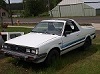
April 11, 201213 yr I have been a member of this site for about 2 years now but have only recently been posting. I originally joined for my 93 Legacy wagon that I used to own. I have recently sold it tho due to transmission problems and to Buy my new 86 BRAT. I have been a subaru fan ever since my brother got his 87 GL wagon several years ago then i got my Legacy and learned how great Subarus are. I had been searching for a BRAT for a while and came across the beast i now own. It only has a few minor dings and a few little spots of rust that should be easy to fix. It only has 160,000 original miles and is in great shape the engine is totally clean. I bought it for 3000 even so a little pricey but it was worth it. Well that is enough for now, I hope to learn alot from you guys and will be a steady poster on here in the future starting with the restoration of my BRAT Jeremy
April 12, 201213 yr Much better to pay a little more for something running and in good shape then paying too little and getting overwhelemed and never being able to drive the thing cause its breaking down all the time . Have pictures up yet?
April 12, 201213 yr Author yeah I have some pics in the 80's subaru thread. http://www.ultimatesubaru.org/forum/showthread.php?t=131633

Please sign in to comment
You will be able to leave a comment after signing in
Sign In Now