March 8, 201313 yr Hi, I have been a 'lurker' about these forums & thought I'd beter say 'Gidday' and show you some of my work ... See the tag below for some of my rides ... Edited March 10, 201313 yr by Bantum
March 10, 201313 yr Author Just in case the links don't show here are some others : '76 Wagon '82 Touring Wagon '85 Brumby Sports Looking to do some post / build threads on them later ... Edited March 10, 201313 yr by Bantum
March 10, 201313 yr Gidday Mate, and welcome aboard USMB! Good looking fleet you've got going there. And from the photo captions it looks like you enjoy driving them too--good on ya'!
March 21, 201313 yr Author Thankyou, unfortunaetly the GFC has hit home & have not been able to enjoy them as much, so had them put in storage for now ... Add : Other projects that I'm working on are the XV-Ute & The AUSubaru WIki ... Cheers, Bantum ... Edited September 9, 201312 yr by Bantum
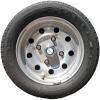
September 9, 201312 yr Author Small update : After much searching I have finally found a spare wheel for my Brumby: More details can be found on the AUSubaru site under Bantum's Brumby ... Cheers, Bantum ... Edited September 9, 201312 yr by Bantum
Please sign in to comment
You will be able to leave a comment after signing in
Sign In Now