April 13, 201312 yr I just spent the best 10,000 pennies of my life last weekend. Ive got a 78 BRAT w some spares and an ea81 dropped in. this wont be my build thread, but rather a thread for those new to the historic soobs. im looking for general knowledge, anecdotal help, modifications experience etc..... basically if your buddy/son/ etc got one of these what could you tell them.? Ive done some searching for wiring diagrams and have found none but those with dead links or pay to play. Lets see the knowledge drop..............
April 13, 201312 yr i would sugest getting a factory subaru manual they help a lot. also collect lots of parts for spares or even whole cars. some mods are the six lug sawp and ea81 with a dual range transmission which is a great combo for the old stuff.
April 13, 201312 yr Author i will get a gen 1 fsm asap. currently i have htkysa and a chilton... i am familiar with ea series engines but its been a couple years since ive had an ohv model. as far as collecting more cars goes, i need to let a couple go first. My main goal for this thread is to find out what people have done to their gen1 roos. mine has been hacked somewhat but i have an extra harness and all kinds of other stuff. itll end up lifted im almost sure of it... but before then i need to absorb as much as i can from folks who have rocked these for decades. What have you done to your gen 1? i guess that should be this threads title
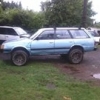
April 13, 201312 yr Author https://sphotos-b.xx.fbcdn.net/hphotos-prn1/p480x480/555546_170279993127374_911217211_n.jpg heres one

Please sign in to comment
You will be able to leave a comment after signing in
Sign In Now