Skip to content
View in the app

A better way to browse. Learn more.

Ultimate Subaru Message Board

A full-screen app on your home screen with push notifications, badges and more.

To install this app on iOS and iPadOS
  1. Tap the Share icon in Safari
  2. Scroll the menu and tap Add to Home Screen.
  3. Tap Add in the top-right corner.
To install this app on Android
  1. Tap the 3-dot menu (⋮) in the top-right corner of the browser.
  2. Tap Add to Home screen or Install app.
  3. Confirm by tapping Install.

Accelerator Cable attachment 86 Brat w/Weber

Featured Replies

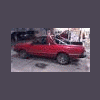
I finally got my Weber put on my Brat, got it to run wahoo, runs AWESOME, have yet to drive it, waiting on more parts for front end.


Anyway my question is, I'm having trouble attaching the accelerator cable to the Weber in a proper way, aside from the green zip tie or baling wire, the zip tie will eventually fail and have to redo it.

Any ideas would be greatly appreciated.

post-38620-0-96623100-1378261743_thumb.jpg

  • Author

Thanks to my extensive searching THE wrong words, I didn't find it initially, I see now I just need to pull the linkage off my Hitachi and put it on my Weber, thought there was something I was missing, NOPE just me.

Please sign in to comment

You will be able to leave a comment after signing in

Sign In Now

Account

Navigation

Search

Search

Configure browser push notifications

Chrome (Android)
  1. Tap the lock icon next to the address bar.
  2. Tap Permissions → Notifications.
  3. Adjust your preference.
Chrome (Desktop)
  1. Click the padlock icon in the address bar.
  2. Select Site settings.
  3. Find Notifications and adjust your preference.