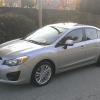
October 26, 201312 yr New member, first post - just purchased a 2013 Impreza w/ 5-speed. Love the vehicle right away, and also love the sound of the boxer engine. Any advice for an aftermarket exhaust kit? I understand there are a variety of choices for the WRX/STI but I was wondering if adding aftermarket exhaust should even be a consideration for my N/A Impreza. I'm also considering a K&N filter. It's cheap and seems to add a bit better gas mileage in my experience with previous vehicles. Thx
October 27, 201312 yr If I were you I'd just cut the muffler out (and swap mid pipe resonator for straight section for a little extra drone) and go with an aftermarket muffler with 2" -2.5" dual outs instead, but shop carefully to avoid a terrible sounding muffler. It's pointless replacing the entire NA exhaust for basically no performance gain and just a different sound, hence a muffler swap. If it were turbo, then I'd say go with a larger down pipe, and 2.5" from cat-back. I used to buy K&N but now just get paper element w/o a metal screen impregnated into the rubber as it's a restriction. Also, the oil from the filter can coat the MAF sensor (if that has one) so be mindful.
October 27, 201312 yr As understand k&N filters allow more air because they have bigger pores. Bigger pores mean bigger particles. http://www.bobistheoilguy.com/airfilter/airtest3.htm

Please sign in to comment
You will be able to leave a comment after signing in
Sign In Now