December 9, 201312 yr Hello ,I am looking for the No 5453 Gr.1 FIA Homologation Form(pdf ),issued in 1/4/1972.I am looking,also,for all the necessary information(books,leaflets,manuals,etc)to effectuate a total rebuilding of some 1972-1973 4door 1400 LEONE.
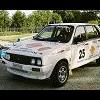
February 4, 201412 yr No one got it???? Ive been looking for ANY information on my 1976 Leone.... i be,ieve it was used in the 1970s baja SCORE 250/500 races. Do you have pics of yours? Heres mine:
February 6, 201412 yr Author I have in mind to rebuild totally some of the old Subis.I mean the ff1(1967-1971) and the Leone of first generation(1972-1979).I have in mind,also,to prepare some for competition use.Before that I would like to know what body exactly(4 door sedan,2 door sedan,coupe,etc)is homologated in each one of the old FIA homologation forms.I saw the numbers of the homologation forms in the FIA site but I have to read each one of the homologation forms,to decide what body type to choose. I can't pay at least 80 euros for each one of the 8 homologation forms(6 for the ff1 and 2 for the Leone).To be noted that when I decide to begin it is necessary to have the original FIA homologation form bought from the local Automobile Club member of the FIA.So I am looking for these old FIA homologations(Gr.1 and Gr.2)in pdf form Any other books,brochures,manuals,etc.,in pdf form are welcomed.

Please sign in to comment
You will be able to leave a comment after signing in
Sign In Now