Skip to content
View in the app

A better way to browse. Learn more.

Ultimate Subaru Message Board

A full-screen app on your home screen with push notifications, badges and more.

To install this app on iOS and iPadOS
  1. Tap the Share icon in Safari
  2. Scroll the menu and tap Add to Home Screen.
  3. Tap Add in the top-right corner.
To install this app on Android
  1. Tap the 3-dot menu (⋮) in the top-right corner of the browser.
  2. Tap Add to Home screen or Install app.
  3. Confirm by tapping Install.

S-U-C-C-E-S-S !

Featured Replies

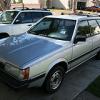
I took my first drive in my fully functioning* Subaru GL this morning. Since I really didn't do much besides disassemble and reassemble, I have to credit prayer for this ride.


I have full auto transmission capability, working gauges, working heating and ventilation controls and working cruise control.  Yahoo!!, and Thank You for all the comments, suggestions and instructions. 


* Now by fully functioning, I don't mean perfect. The radio is out and the heater core has a pinhole leak that provides a nice glycol schvits as I go down the road. But (and this is critical) I go down the road!

Good to hear. Did you give the governor one last go through to get  it working or did it just start working by itself?

  • Author

I took it for a drive and it shifted fine.

Please sign in to comment

You will be able to leave a comment after signing in

Sign In Now

Account

Navigation

Search

Search

Configure browser push notifications

Chrome (Android)
  1. Tap the lock icon next to the address bar.
  2. Tap Permissions → Notifications.
  3. Adjust your preference.
Chrome (Desktop)
  1. Click the padlock icon in the address bar.
  2. Select Site settings.
  3. Find Notifications and adjust your preference.