Skip to content
View in the app

A better way to browse. Learn more.

Ultimate Subaru Message Board

A full-screen app on your home screen with push notifications, badges and more.

To install this app on iOS and iPadOS
  1. Tap the Share icon in Safari
  2. Scroll the menu and tap Add to Home Screen.
  3. Tap Add in the top-right corner.
To install this app on Android
  1. Tap the 3-dot menu (⋮) in the top-right corner of the browser.
  2. Tap Add to Home screen or Install app.
  3. Confirm by tapping Install.

Soob Noob is Here

Featured Replies

Hi all,


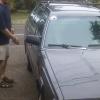
My name's Peter. I'm a veteran DIY car guy but this is my first Subie: A '92 Loyale wagon, 5-speed, 233k miles, just paid $1100. I'm getting new tires on right now, I know I'm going to need to replace at least 2 CV boots, and we'll see how it goes after that! So far, I'm thrilled to drive the little beastie. It's very...flingable. 


That's me on the passenger side and Boy #3 on the driver's side. 

post-53516-0-23403200-1401214772_thumb.jpg

Ah, flingability--a rare and highly desirable quality.


Welcome aboard, Peter.  You're going to love this place.  Best resource a Subaru owner can have!

Please sign in to comment

You will be able to leave a comment after signing in

Sign In Now

Account

Navigation

Search

Search

Configure browser push notifications

Chrome (Android)
  1. Tap the lock icon next to the address bar.
  2. Tap Permissions → Notifications.
  3. Adjust your preference.
Chrome (Desktop)
  1. Click the padlock icon in the address bar.
  2. Select Site settings.
  3. Find Notifications and adjust your preference.