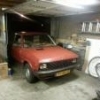
October 6, 201411 yr Hey guys, My car's a Zastava Yugo Koral 55A, better known as the Yugo! I'm from the Netherlands and I work at a customshop, as an apprentice, I've been dreaming of building my own car. I'll keep this from being uneccesarily long or filled with facts about the Yugo, basically what I want to do is use the Yugo body in combination with a (probably) 90's Subaru AWD drivetrain. I haven't planned anything yet but I'm seriously contemplating the idea, since I love Yugo's but would love to have it be a real sleeper capable of some serious rally racing and overall street action. Plus being an apprentice at a customshop it's very good I ever do a complete project myself. Thanks, Ren Edited October 6, 201411 yr by Renier
October 12, 201411 yr Ren, Welcome to the USMB! There are a lot of knowledgeable people on the USMB and should be able to provide some input on the Subaru drivetrain if you decide to tackle the project
October 13, 201411 yr That sounds like fun! Once you start it, take lots of pictures and ask as many questions as you can think of! We love both around here, especially when it involves something quirky. And welcome to USMB! Enjoy your stay Twitch
October 13, 201411 yr one thing you may run into if using a Subaru layout like a EA82 or a legacy is the hood length is quite short on the Yugo compared to this layout, I ran into that problem when I wanted to do a Justy body with is similar to the Yugo , just not enuff room in front of the axle

Please sign in to comment
You will be able to leave a comment after signing in
Sign In Now