May 20, 201510 yr Ok so let's start from the point why I'm asking the question: My original coupe rear right tail light is cracked badly and altought I already acquired the only spare tail light available here it seems that the newly acquired light has lots of small cracks forming in the lenses too. There is tons of sedan tail lights available still used but none of these coupe ones has came by. Also keep in mind these are European lights so they have that fog light as standard but otherwise same size as other market lights. (some pictures of the newly acquired one): Okay so what I'm after is some info regardint the differences between Sedan and Coupe lights. I know they differ slightly in appereance since the coupe lights has that black part on the upper part of the light and also a bit more lens on the license plate side. But is that all of the differences or is there some more like mounting point and hole dfferences etc. ?
May 28, 201510 yr Wish I could help but the Coupe is about as common in Australia as a Reindeer, Hopefully one of our American or other European or English Friends can chip in an answer.
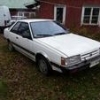
May 28, 201510 yr Wish I could help but the Coupe is about as common in Australia as a Reindeer, Hopefully one of our American or other European or English Friends can chip in an answer. Slightly more common here, not by much though. An 84 example Edited May 28, 201510 yr by Dinky26

Please sign in to comment
You will be able to leave a comment after signing in
Sign In Now