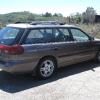
July 27, 201510 yr New owner of an old Subaru, here. I'm trying to decipher the codes on the metal engine compartment plate. So far, I've managed to break down the VIN as follows: 1995 Legacy L 2nd generation non-raised roof station wagon with 2200cc engine and full-time AWD (made in Lafayette, Indiana). But where can I find information on "Applied Model", "Option Code", "Trim Code" and "Color Code"? I did a search of the forums, but didn't find anything that defines the specific codes on my particular plate. Any assistance greatly appreciated. Thanks! Edited July 27, 201510 yr by xntryk1
July 27, 201510 yr Author Maybe. It's just odd that there's NOTHING online about it. Seems like something a lot of people would be interested in. Which leads me to believe it might not exist at all...
July 27, 201510 yr Trim code is interior color I believe. Color code is exterior color. Option code and applied model I'm not sure of. Someone who may know is Joe Spitz of Cars101.com. I don't see that info posted on the site just at a quick glance, but you could probably email him and ask.

Please sign in to comment
You will be able to leave a comment after signing in
Sign In Now