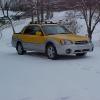
November 10, 200421 yr My 2003 Baja has about 14,000 miles on it and from day one has this weird intermittant clutch shudder. Sort of like if I were learning to drive a stick shift. Well I've been driving stick shifts for 18 years and know how to drive one by now. In order to prevent the car from shaking violently when releasing the clutch (like I would on any other car with a manual transmission), I have to rev it just a bit higher and let out on the clutch just a bit slower. I used to think it did this worse when cold but it's more of a random condition. I've read this is a common problem with Subarus and I should take it to the dealership and have it checked out. I was told by some members I had a defective clutch. So a few months ago I called the local dealership to set up an appointment. Well guess what, they had never heard of this! Sort of got the impression they would find nothing wrong and just tell me I didn't know how to drive a car with a manual transmission. OK first question. What's the cause of this? A defective pressure plate? Second, can someone tell me the service bulletin number so I can tell the dealership since they have never heard of it. Maybe this will set them on the right track. I shouldn't have to drive this car any different than any of my other cars to prevent it from jerking and going on.
November 10, 200421 yr If you PM me you e-mail address, I can send you a PDF I got off this site a few months ago... Seb

Please sign in to comment
You will be able to leave a comment after signing in
Sign In Now