September 12, 200322 yr Okay... I've thrown up a website. It's very rough at the moment, but there are a couple pics of my car and such. Let me know what you think! (feedback page doesn't work) http://home.comcast.net/~reoff/ Rich
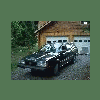
September 12, 200322 yr I have a pic somewhere of my 87 GL-10 TurboWagon.. It was taken in CO..Looks a lot like the pic of your white 86.. not just the car, but the background as well.. at first glance, I thought it was my pic!
September 12, 200322 yr I noticed you were wishing you had more than 1 pic of your old wagon on your website..... Old website pics were moved to http://photos.usmb.net Your pics within that site are here: http://usmb.net/gallery/albun07
September 13, 200322 yr Author I didn't realize those were still floating around... I'll get those up ASAP (as well as making the site a bit more... ummm... personal) That pic of my old Soob was taken through the window of my travel trailer. It was sitting in my yard in NW Washington.

Please sign in to comment
You will be able to leave a comment after signing in
Sign In Now