February 14, 200620 yr hope nothing is too rough on it. Makes me think I'm too confident with my Forester always thinking that it is not too valuable and nobody will steal it.
February 16, 200620 yr That rocks that you got your car back with minimum damage. Seeing as they smoked the clutch, you might want to cruize around and look for AWD burnouts and nuts. How are the tires? Get the popo's to dust the pepsi can (unless you went and grabbed it). It may be a print on file and put some crack head behind bars.
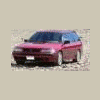
February 16, 200620 yr Glad you got her back...I would be devistated if anyone stole mine..but then again they would have to be pretty desperate:rolleyes: . At least they didnt wreck it. Sure is pretty
February 16, 200620 yr Posting late in this thread because my browser went and took a dump on me (Does Subaru make web browsers?). I'm very glad that you got that beautiful car back. I was heartsick that you had lost it. May fortune continue to smile on you and keep you and that lovely car safe.

Please sign in to comment
You will be able to leave a comment after signing in
Sign In Now