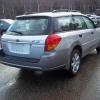
August 17, 200718 yr now i just gotta wait till mon(tues the latest) to get it registered.. pics were taken with cell phone http://www.ultimatesubaru.org/photos/showphoto.php?photo=16277&cat=500&ppuser=9465 http://www.ultimatesubaru.org/photos/showphoto.php?photo=16276&cat=500&ppuser=9465 http://www.ultimatesubaru.org/photos/showphoto.php?photo=16278&cat=500&ppuser=9465 (yup,needs some cleaning) will be putting on the alloys that came off the 94 leg (snow flakes)http://www.ultimatesubaru.org/photos/showphoto.php?photo=13694&cat=669 not to mention my cd player,speakers,etc...
August 19, 200718 yr Author cool. Seems pretty clean to me semi-clean outside,complete filth on the inside...looks like it was never cleaned at all( i got about 1lb of dirt from carpets)took about 2hrs to clean the carpets and still not done. outside,it's mainly wash and then concentrate on the few rust spots..

Please sign in to comment
You will be able to leave a comment after signing in
Sign In Now