September 4, 200817 yr Was over there yesterday. Found one of the cleanest Hatchbacks I've ever seen. Red with tan interior.130k, 4x4,'87, ea81....Looked like someone ran into an elk with it,thou. Smashed from the grill to the firewall. I managed to get the nippon dizzy out, but the shaft was bent. The interior was near flawless.
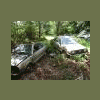
September 4, 200817 yr Was over there yesterday. Found one of the cleanest Hatchbacks I've ever seen. Red with tan interior.130k, 4x4,'87, ea81....Looked like someone ran into an elk with it,thou. Smashed from the grill to the firewall. I managed to get the nippon dizzy out, but the shaft was bent. The interior was near flawless. I think its gone now, cause I was there today and didnt see it :-\ They had just cleaned out a couple of rows too.
September 4, 200817 yr Author What the heck? Cars don't last long there. I went back for some parts off a turbo wagon that had only been there a week. It was gone too. Maybe someone bought the whole thing. The engine and 4sd were "like new" clean. Door panels and interior were as nice. You would have had to sawzall the front clip off to get the engine out.
September 4, 200817 yr They wont sell whole cars that are already out in the yard. Was the T-Wagon white? If so, its still there. Has rear disc brakes on it. No LSD. One burgandy XT 2wd AT there also. I think the struts were still on it. No rear disc on that one.

Please sign in to comment
You will be able to leave a comment after signing in
Sign In Now