Skip to content
View in the app

A better way to browse. Learn more.

Ultimate Subaru Message Board

A full-screen app on your home screen with push notifications, badges and more.

To install this app on iOS and iPadOS
  1. Tap the Share icon in Safari
  2. Scroll the menu and tap Add to Home Screen.
  3. Tap Add in the top-right corner.
To install this app on Android
  1. Tap the 3-dot menu (⋮) in the top-right corner of the browser.
  2. Tap Add to Home screen or Install app.
  3. Confirm by tapping Install.

EA81 T and EA after markets

Featured Replies

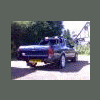
just to put back up after the server was changed, was only in the playground, though whoever missed it can have a look as well


hydsubaruturboea81.jpg


RAM engines 200hp supercharged EA as well


kr8200hpsupercharged001sized.jpg


what the hey, mine as well lol


6rnimage069.jpg

  • Author

i wish the exchange rate was how it was once, $2.1-£1! lol, thinkin bout the charger, but im defo gonna go with the forged internals, i want 160 N/A! that'll be just be awesome, put some bigger carbs on the setup ive got, the bottom one, and then up the compression, and a full stainless system, arrr yeah


then 1 BAR boost with the charger, yeah i know, a bit much, but that'll be way over 200, maybe 240ish? :banana: WOOOOO!!!!!!!!!!


BAAAAAAAAAAANNNNNNNNNGGGGGGGGGGGG!!!!!!!!!!!!!!!!!!!! went the drivetrain :lol:

Please sign in to comment

You will be able to leave a comment after signing in

Sign In Now

Account

Navigation

Search

Search

Configure browser push notifications

Chrome (Android)
  1. Tap the lock icon next to the address bar.
  2. Tap Permissions → Notifications.
  3. Adjust your preference.
Chrome (Desktop)
  1. Click the padlock icon in the address bar.
  2. Select Site settings.
  3. Find Notifications and adjust your preference.