April 11, 200916 yr Author Lookin good! I see fender cutting and bashing in your future, sir. Thank you! Yeah maybe a little. I still really have to put some 4WD struts in the front. It still has the 2WD struts from its 2WD days. That would help. I plan on doing a little trimming of the front valance, and other than that, there hasn't been any rubbing yet.
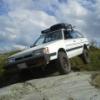
June 6, 200916 yr Author So it's been a while but I have done some more to the car. I still have to get some pics but here's whats new. Roof Racks installed, just cheap ones, EA81 installed with Bills EA82 power steering conversion bracket, 3 Hella 500's mounted on the front bumper, just got them wired up today. And a new CV axle installed. It's starting to look better and better. I might put my LSD rear diff in as well. I will be taking a trip to Northern Maine in a few weeks and will get to test it's off road capabilities, and the new Hella's will come in very handy while trying to avoid all the Moose that will be out after dark!!!

Please sign in to comment
You will be able to leave a comment after signing in
Sign In Now