
Leaderboard
-
idosubaru
Members1Points26995Posts -
czny
Members1Points817Posts -
pontoontodd
Members1Points2618Posts

.thumb.jpg.96479a473cd1ed4b8bac667c0ee181f5.jpg)
Popular Content
Showing content with the highest reputation on 01/26/24 in Posts
-
1 pointWork up to the needed drill size in steps from smaller to required size. Use drill & tap fluid. Find a friend with a steady hand to do the drilling if you think you can;t hold the drill steady. You may be able to find thick-walled steel bushings at McMaster to hold against the case surface for a drill guide. Some are available at bigger Ace Hardware stores too. Take your time. Don't rush it.1 point
-
1 pointOh man that's so tough. But hey you are VERY close. I have chased the existing/damaged threads and installed a longer bolt a couple of times. The bolt holes are sometimes (always?) deeper than the bolts, so there are unused clean threads in the bottom of the holes. You can poke a tooth pick or coat hanger down the hole and compare it to the length of bolt sticking out the back of the pulley so you know how much "additional" thread you're getting. Not that you'd want to do this of course!1 point
-
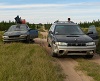
Mounted regulator, assembled and installed fuel lines. I think I have the engine harness plug pinned out well enough to get the engine running. Pinned out the connector for the DBW pedal. Which doesn't look like it will directly bolt in place of the Impreza gas pedal, will have to figure out something there. The rear brumper for the Forester just needs to be welded and painted. And yes that's road salt. Made tubes running forward from the bottom of the bumper to the swaybar brackets. Made the one on the right side easily removable, should protect the carbon canister.1 point