Skip to content
View in the app

A better way to browse. Learn more.

Ultimate Subaru Message Board

A full-screen app on your home screen with push notifications, badges and more.

To install this app on iOS and iPadOS
  1. Tap the Share icon in Safari
  2. Scroll the menu and tap Add to Home Screen.
  3. Tap Add in the top-right corner.
To install this app on Android
  1. Tap the 3-dot menu (⋮) in the top-right corner of the browser.
  2. Tap Add to Home screen or Install app.
  3. Confirm by tapping Install.

McJesse

Members
  • Joined

  • Last visited

Everything posted by McJesse

  1. hahaha yeah dnr is on you all the time. but i live in BG to. im actually putting my lift on it tomorow but i need to find tires. i was thinking of tractor tires that'll give me good traction:grin: but yeah im down for going riding with you
  2. Thanks man it should be great. It's a 1985 Gl Wagon
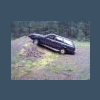
  3. Working on the carberator Took all the carpet out This Brew has been sitting in a field for about 10-15 years and my friend got it running in about a week.Also i'm about to put a 2 1/2" lift on it hopfully it'll work out;im making it homemade.
  4. yeah hahaha so did my brew I got mine for free from my friends grandpa and it was sitting in a field for like 10-15 years and oh it also had snake skins in it to! haha with a nest in the glove box and in the back where yours was to
Account

Navigation

Search

Search

Configure browser push notifications

Chrome (Android)
  1. Tap the lock icon next to the address bar.
  2. Tap Permissions → Notifications.
  3. Adjust your preference.
Chrome (Desktop)
  1. Click the padlock icon in the address bar.
  2. Select Site settings.
  3. Find Notifications and adjust your preference.