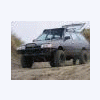
September 30, 200916 yr hi i'm spencer, glad to join this site in hopes of hookin up with people with similar interests and to b.s. bout soobstuff! first off, i've had probly bout 10-15 subarus ranging from 1980 to 2008. currently i own an 08 outback xt which is way sweet but not my favorite, also i have a 92 legacy, also not my favorite. my favorite is my 90 loyale! with some help from my fab crazy cousin we have lifted it 6 inches, also i installed a d/r tranny, rear disc brakes, and a 94 2.2! this ride is totally sweet. the lift is wayyyyy tougher than anything i've seen for sale online, but yet is not too much. it is built correctly and handles very good, both on and offroad. hope to have some pics up soon. i would like to know which forums would best be related to my interests and also possibly to hook up with other folks from swwa and nwor who also have modified soobs and would like to do some offroading. thanks
September 30, 200916 yr You're in the right place, in two different senses of the phrase... This place is AWESOME for info on all kinds of subes. And also, there are a ton of people in your area. I'm sure they'll chime in too Twitch
October 1, 200916 yr Welcome, and we'd love to see some pics of it. The off-road and trail news sections will be helpful.

Please sign in to comment
You will be able to leave a comment after signing in
Sign In Now