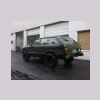
October 14, 200916 yr i just picked up a 1999 Subaru EJ22 engine and manual 5 speed transmission. This set-up came out of a 1999 Impreza sedan with 100,000 miles, The package includes everything to do a complete engine swap i hope !! engine, transmission, complete wiring harness and ECU (ECM). Includes intake, throttle body, wiring, ignition, AC compressor, Alternator, Power steering pump and a ACT Streetlite lightweight racing flywheel so where do i start ? can i use The 1999 transmission ? it is AWD 5speed with 3.9 final drive, and includes rear drive shaft (prop shaft). . if not what tranny can i use ? will this engine work in a brat ? its a 1999 Impreza sedan ej22 anyone in Portland looking for some $ide work that could help out with the install or and the wiring ? i thought their was someone that does the harness work on the board do i use the ACT Streetlite lightweight racing flywheel out of the 1999 doner or will my centerforce stage 2 clutch work out of my ea81 ? so many questions !!!! Help
October 14, 200916 yr have you read the conversion manual? that should get you turned in the right direction... http://www.numbchuxconversions.com/Files/EA2EJ.pdf using the impreza trans, you'll run into issues with the driveshaft, axles (25 spline, as discussed in the RX thread), crossmembers, linkage, etc. or, use your EA81 trans with an adapter plate. not an ideal trans for the project, but it would work, and would require less fabrication. I do the harness modifications. your first message didn't have a return email address.....but I just replied to your last one.
October 16, 200916 yr Author Thanks for the reply. i will send you the harness as soon as i get your addy. Dave

Please sign in to comment
You will be able to leave a comment after signing in
Sign In Now