Skip to content
View in the app

A better way to browse. Learn more.

Ultimate Subaru Message Board

A full-screen app on your home screen with push notifications, badges and more.

To install this app on iOS and iPadOS
  1. Tap the Share icon in Safari
  2. Scroll the menu and tap Add to Home Screen.
  3. Tap Add in the top-right corner.
To install this app on Android
  1. Tap the 3-dot menu (⋮) in the top-right corner of the browser.
  2. Tap Add to Home screen or Install app.
  3. Confirm by tapping Install.

Took a shot

Featured Replies

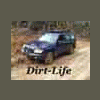
I like the second one better too! What editing software did you use?? I used the one that came on my macbook that I bought in 08.. Lemme know whatcha think. Also, wow, looks like some damage buddy! Sorry to see the price your subey has had to pay.


  • Author
I like the second one better too! What editing software did you use?? I used the one that came on my macbook that I bought in 08.. Lemme know whatcha think. Also, wow, looks like some damage buddy! Sorry to see the price your subey has had to pay.


MovieMaker that came with Windows,didn't even know it was in there,found it by accident and just played around with it.


how did you blow the motor?Did you hydro-lock it?


Yep I hydro-locked it,ran fine for about 2 weeks then BLAM.

Please sign in to comment

You will be able to leave a comment after signing in

Sign In Now

Account

Navigation

Search

Search

Configure browser push notifications

Chrome (Android)
  1. Tap the lock icon next to the address bar.
  2. Tap Permissions → Notifications.
  3. Adjust your preference.
Chrome (Desktop)
  1. Click the padlock icon in the address bar.
  2. Select Site settings.
  3. Find Notifications and adjust your preference.