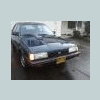
October 5, 201015 yr So, I figure this could be an ongoing forum posting for those that need it.. But right now I need to know. Been searching C-List for tires. Right now my Subaru (1984 Subaru DL Sedan) has these: 155/80/R13 79T So that means 155mm, 13in wheel and an 80 profile tire. IS THIS STOCK? Ive heard 175/80/R13 was stock...
October 5, 201015 yr Maybe on the wagons... I think the sedans might have taken a narrower tire stock. And 2wd ones took a smaller tires stock as well, IIRC. Z
October 5, 201015 yr So, I figure this could be an ongoing forum posting for those that need it.. But right now I need to know. Been searching C-List for tires. Right now my Subaru (1984 Subaru DL Sedan) has these: 155/80/R13 79T So that means 155mm, 13in wheel and an 80 profile tire. IS THIS STOCK? Ive heard 175/80/R13 was stock... Look inside the door pillar for the VIN tag. It will have tire sizes on it.

Please sign in to comment
You will be able to leave a comment after signing in
Sign In Now