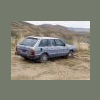
December 30, 201015 yr So, finally got the 84 GL going dependably every day, again (still using coolant, still needs rotors, still needs D/S front axle...). In 4-High, once you begin to approach, say, 25-30 mph it begins to make a pretty identifiable howl from the rear that does change in pitch with speed. Possibly marginally louder on deceleration, and shift back into 2WD and the car is again silent (except for that bloody axle). Two secondary questions: 1) How fast should one go in 4-High? Roads here, when snow-covered could easily be taken at 40-45, providing visibility, and the brakes seem unbelievably good... Thoughts? 2) I have never actually seen the owner's manual on this, is the 4WD shift-on-the-fly, or should you stop before changing? I have been waiting till I'm either stopped or very nearly stopped before switching, but when making a turn onto a snow-and-ice-covered mess, just being able to yank her on up into 4WD would be nice. Thanks again for all the help. James
December 30, 201015 yr I usually let off the gas when I shift in and out of 4wd, that way I'm not putting force on the transfer gears. As for top speed in 4wd... I've hit about 80mph drifting back roads in 4wd. There's no recommended top speed in 4wd, just don't use it on dry pavement. Duh.

Please sign in to comment
You will be able to leave a comment after signing in
Sign In Now