September 17, 201213 yr Any way to bring back the blue color ? Do I need to replace the whole thing, I can't get the buttons to stay on. How do I fix the bumper sag? Do I loosen it, then jack it up and tighten it back down. Do these just come off with the screws on the top? Sand and spay? Thanks for taking a look:headbang:
September 17, 201213 yr you can try this for the blue http://www.turtlewax.com/product-detail.aspx?prodid=64
September 17, 201213 yr you can try this for the blue http://www.turtlewax.com/product-detail.aspx?prodid=64 that stuff doesn't work on int pieces, works great on bumpers and regular paint. I tried that on my brat (Grey interior) did nothing but make it VERY oily
September 17, 201213 yr 1. If you can peel a blue interior off of an identical car at the auto wreckers, then buy it and take it home and reinstall it on yours. 2. Add a slight touch of silicone on each clear button, to keep the over button. 3. 2 bolts on each side control the tilt of the front bumpers which can be readjusted. 4. The top rails are riveted in place. Forget about removing them. Paint with Hi-temp black instead.
September 18, 201213 yr you can use wd40 to re moisten the dry plastics. then treat with silicone spray. treat once a week until the color begins to stay. the color comes back until whatever you put on it evaporates. use an interior product that has uv protection. avoid armor-alls and stick with something silicone based.
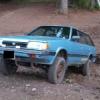
September 18, 201213 yr Author Cool Any thoughts about cracked door cards? I have been looking at the junk yard but I can't find any blue ones, Is there any thing I can do to stop further cracking? And two of my runners on the roof have screws so this happened today... [/img] [/img]

Please sign in to comment
You will be able to leave a comment after signing in
Sign In Now