October 14, 201213 yr i need help in wiring the third eye to the radio shack relay all the diagrams and information i have found so far has not been very specific to where each connection goes so if you have wired one up and can tell me where each wire goes it would be very helpful and apprieated
October 14, 201213 yr here http://www.indysworld.com/80s/general/USRM/mick-usrm/electrical/centerlamp-relay.pdf also it comes up top of the page on google Ben
October 18, 201213 yr Author still need help:brow:i suck at wiring besides easy stuff the indeys world pages for this are not specific to where to put the wires because the relay is numbered like this 1 2 3 4 5 6 7 8 http://www.indysworld.com/80s/general/USRM/3rdEye/using_center_light_w.htm help is very much wanted here and very needed
October 18, 201213 yr this is taken directly from the diagram I posted above. if it is the same configuration as the one you have. _ _ 1 2 _ _ 3 4 _ _ 5 6 l l 7 8 1,2 = 12v constant power source(fused) 3 = door closed wire 4= no connection 5 = door open wire 6 = 12v lamp positive terminal 7 = 12v power source from the switch 8 = ground all the info should be there between the two write ups to make this work
October 18, 201213 yr a word of caustion using those relays... they are not particularly suited for lots of vibration or hot/wet environments....
October 19, 201213 yr Author figured it out:headbang::headbang:i was making it a little more compicated than it should have been:oand the door keeps on opening and closing but i will figure that out as soon as i hook it back up on the brat i took it off to wire it up to make it work with a spare battery
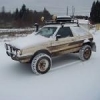
November 11, 201213 yr Author figured it all out yesterday and its installed all the way, wired(with fuse to battery), electrical taped, setup on two toggle switches one controlling the door motor and one controlling the light:banana:

Please sign in to comment
You will be able to leave a comment after signing in
Sign In Now