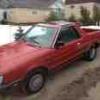
March 10, 201313 yr awesome, hope you enjoy the brat, I'll have another one myself, hopefully before I hit 35 lol
March 10, 201313 yr Hell yeah brother! I had a blast yesterday. Tom is a great dude, and always has a cold beer waiting for ya. It was fun talking Subaru with another passionate old gen guy, and I was proud to finally sit in those jump seats! I can't wait to help get this thing back in to fighting shape, and it should make for an easy project. Thanks again for the hook up on the hood cable and fenders Tom!
March 16, 201313 yr Was definetly good to meet you Travis, and to see James again. Sad to sell the BRAT, in a way, but more than happy to sell it to someone that will appreciate what it is they have. Be sure to let me know if you need things for it. I just may have it, you saw only a small part of my stash here.

Please sign in to comment
You will be able to leave a comment after signing in
Sign In Now