November 10, 201312 yr Alright I got an 85 brat can't figure out how to mount the A bar style brush guard. Any pictures or input would be hella awesome.
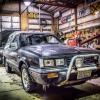
November 10, 201312 yr Alright I got an 85 brat can't figure out how to mount the A bar style brush guard. Any pictures or input would be hella awesome. maybe this picture can help, i know you said A Bar style but this should be the same mounting spot
November 10, 201312 yr Author The one I got looms like it mounts to the engine subframe. Is yours using the tow hooks?
November 11, 201312 yr If I remember correctly there are some brackets near the front that mount to some holes in the bumper supports, and then the backmounts to the cross member bolts.
November 11, 201312 yr Author Does anyone have one and be willing to snap a few photos. That would be awesome!
November 11, 201312 yr If it doesn't seem to fit right you could have a Gen 1 A-bar(77-80)......won't bolt onto a Gen 2(80+, 82+ Brat) car.
February 7, 201412 yr Author It a oe bull bar. The first one I got was for a first gen didn't work, found a secound gen one from a member on the board.
September 3, 201510 yr Author No mine just bolted right up. The brackets that hold it to the bumper support were that hardest part.

Please sign in to comment
You will be able to leave a comment after signing in
Sign In Now