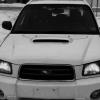
March 3, 201412 yr Man...this place has changed. I haven't been back in a while. But now I'm a Suby monger again. I'm gonna be back for good this time. You guys are real cool. Here's my FXT: Edited March 4, 201412 yr by thatswhatshesaid
March 4, 201412 yr ... back for good ... Welcome Back! ... . That is your Subaru "Forester XT" which by the way, looks Nice. The Subaru "XT" is another model, from the late 1980's decade. Kind Regards. Edited March 4, 201412 yr by Loyale 2.7 Turbo
March 4, 201412 yr I made my return after a nearly 5 year hiatus in Dec '12. How long have you been away?
March 4, 201412 yr Author ha ha. I know what XTs are. Thanks for the re-reception, folks. Oh, and I was out for like...a year and a half. Silly me!
March 8, 201412 yr Author update: Just picked up this AMAZING OBXT Limited (5 speed)... I can't decide between Forester and Outback now! I think I may have a problem... Edited March 8, 201412 yr by thatswhatshesaid

Please sign in to comment
You will be able to leave a comment after signing in
Sign In Now