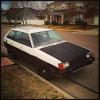
March 31, 201511 yr Hi Everyone, Just got a 1982 GL Wagon for $175, this was a nostalgia buy, as my parents drove me around as a kid in this car in the 80's/90's. The guy I bought it from said it needed a new fuel pump, I took him at his word and put a new one in, the fuel pump is not getting current. I traced the wire from the pump all the way to this funky relay (that's a total guess) that I can't find ANYTHING about online. Help!? Just need to get the engine fuel and I think it's ready to go. The previous owner did seem to tear the stereo out and there are quite a few loose wires about. Is there any in-line fuses I'm missing or is this not a relay at all?
March 31, 201511 yr all of my 1993 impreza's relays say Denso on them, so the chance of that being a relay is pretty high, but i dont know much about EA81 models, hope you find your answer! sorry.
March 31, 201511 yr Its a relay of sorts, called the fuel pump control unit, as well as being a relay it only sends current to the fuel pump when it sees a pulse from the coil (cranking/engine running) So, it could be bad or not seeing the pulses to tell it to power the fuel pump. Search usmb (with google) for fuel pump control unit (fpcu) and you will get more positive results then i could give.

Please sign in to comment
You will be able to leave a comment after signing in
Sign In Now