Skip to content
View in the app

A better way to browse. Learn more.

Ultimate Subaru Message Board

A full-screen app on your home screen with push notifications, badges and more.

To install this app on iOS and iPadOS
  1. Tap the Share icon in Safari
  2. Scroll the menu and tap Add to Home Screen.
  3. Tap Add in the top-right corner.
To install this app on Android
  1. Tap the 3-dot menu (⋮) in the top-right corner of the browser.
  2. Tap Add to Home screen or Install app.
  3. Confirm by tapping Install.

New to Soobies - Building an 818R

Featured Replies

Howdy all,

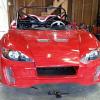
Just started playing with Subarus last year when my son wanted to build a Factory Five 818R.  I liked the 1st "donor" car so much that I kept it as a daily driver!  I have since bought 3 subarus and now plan to build more 818R's.


Jim


post-57854-0-02968900-1428323352_thumb.jpg

Edited by wildhorsesracing

ya....youll fit right in.we need more info and more pictures . subaru porn appeases the masses haha

  • 3 weeks later...

New to subies - Building multiple 818s. Something doesn't quite add up.... J/k that thing is beautiful. I agree with dan, we need more pics

Please sign in to comment

You will be able to leave a comment after signing in

Sign In Now

Account

Navigation

Search

Search

Configure browser push notifications

Chrome (Android)
  1. Tap the lock icon next to the address bar.
  2. Tap Permissions → Notifications.
  3. Adjust your preference.
Chrome (Desktop)
  1. Click the padlock icon in the address bar.
  2. Select Site settings.
  3. Find Notifications and adjust your preference.