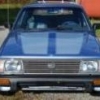
October 22, 201510 yr HEY all. As a newbie to the forum, I wanted to show off my 6th Subaru. I just finished getting it up and running. I call him Sarge, because it looks as if a past owner was in the Air Force Academy (see the sticker in the rear i removed in the cleanup). He has a custom 2 tone metallic air force blue/gray paint job. Looks like a nice job--all the parts I've taken off have the metallic finish underneath. Bought him from a 'dealers collection' in NW PA. Carfax indicates he sat in car several lots in the PNW with only 250 miled added to the odo since 1991. I got him w 102k miles on the odo. The dealer said the carb was unfixable...with a can of carb cleaner and 2 tanks fresh gas and Lucas treatment i got him running, but 18 mpg and frequent stallouts lead me to get a Weber carb/manual choke from redline. Purrs like a kitten at idle and very spunky accel now with the new carb and no underhood spaghetti. Only rustout i've found is the left frame member at the usual jacking point and under the drivers door. Prev Subarus were 78 4wd wagon we bought new, 84 GL wagon and 90 4 dr coupe--all rusted out in 5-6 yrs. Wife has a 2007 Forrester. # 5 is a 78 Brat I picked up in TX for $400. (stashed in the barn for future restoration!)

Please sign in to comment
You will be able to leave a comment after signing in
Sign In Now