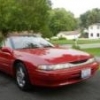
November 19, 201510 yr So my 1993 Subaru SVX is currently at my mechanics where I had him put in a 4.44 Final Drive transmission from a 98 Legacy GT. Got the trans in and the modified rear diff in and went to start the car with no luck. He said the lights came on but wouldn't start. He thinks its the Neutral Safety Switch from the new tranny needs to be swapped out for the one off the old tranny. I don't want him to do this just to find out its something else and still have to pay for it, so is there anything else that would prevent the car from starting when a different trans is put in? Any help is greatly appreciated.
November 20, 201510 yr Check all te wiring as it may be something simple. Is this an auto or a manual conversion ? Did the old one mate up to the new connector? Did he try starting it in Neutral? Edited November 20, 201510 yr by nipper
November 20, 201510 yr Author Its an automatic. The connectors matched up, but I dont think he tried starting it in neutral. Im trying to get a list of things to try before replacing the NSS so I can rule everything else out so im not constantly going back and forth with my mechanic

Please sign in to comment
You will be able to leave a comment after signing in
Sign In Now