Skip to content
View in the app

A better way to browse. Learn more.

Ultimate Subaru Message Board

A full-screen app on your home screen with push notifications, badges and more.

To install this app on iOS and iPadOS
  1. Tap the Share icon in Safari
  2. Scroll the menu and tap Add to Home Screen.
  3. Tap Add in the top-right corner.
To install this app on Android
  1. Tap the 3-dot menu (⋮) in the top-right corner of the browser.
  2. Tap Add to Home screen or Install app.
  3. Confirm by tapping Install.

Featured Replies

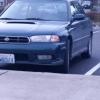
1998 Legacy GT ive posted before about a duty c solenoid, im still struggling with other matters. Ive got big dreams for this car but im falling short .   The current problem im experiencing is i took the car to a specialized subie shop i was informed there was an egr code, which is in reference to the egr valve and like components, ive exhausted all i can think of to fix it, i replaced the main component checked all vacuum hoses i could see and cleard codes.

The weirdness about it comes when i mention that the car has a 96 2.5 JDM engine in it so i have a theory in which new and old ecm dont match and are causing chaos.... PLEASE HELP 

post-60793-0-26422700-1451720945_thumb.jpg

Please sign in to comment

You will be able to leave a comment after signing in

Sign In Now

Account

Navigation

Search

Search

Configure browser push notifications

Chrome (Android)
  1. Tap the lock icon next to the address bar.
  2. Tap Permissions → Notifications.
  3. Adjust your preference.
Chrome (Desktop)
  1. Click the padlock icon in the address bar.
  2. Select Site settings.
  3. Find Notifications and adjust your preference.