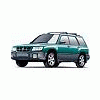
June 3, 200421 yr Did something today to my 2000 Forester that was really dumb. I was parked waiting for someone to come out of a store. When they were on their way to my car, I opened the passenger door and threw it open. *BAM!!* The door hit something solid. I couldn't image what it was, then looked and it was a very low brick wall about a foot high. It was too low to see from my vantage point when I parked there, but it still made me sick. I imagined a big dent, but when I got home, all I could find was a scratch in the gray painted cladding in the edge of the door. Not that bad. Does anyone know if there is a special touch-up paint for the gray cladding? I think it's a plastic material, but I'm not sure.
June 3, 200421 yr We just got some from paintscratch.com. It matches perfectly. Touched up the rocker panel's on my wifes 96OBW we're getting ready to put on the market. They have the type with the flex additive as well. You need your paint code from the doorjamb to place the order. John
June 4, 200421 yr If you have a urethane bumper or spoiler that you can push on, it keeps the paint from cracking. I'd say it's mainly for bumpers, spoilers, ground effects, etc......... I had one on my BMW and the added it to the paint. You could squeeze it all day long and nothing happened to the paint. John

Please sign in to comment
You will be able to leave a comment after signing in
Sign In Now