Skip to content
View in the app

A better way to browse. Learn more.

Ultimate Subaru Message Board

A full-screen app on your home screen with push notifications, badges and more.

To install this app on iOS and iPadOS
  1. Tap the Share icon in Safari
  2. Scroll the menu and tap Add to Home Screen.
  3. Tap Add in the top-right corner.
To install this app on Android
  1. Tap the 3-dot menu (⋮) in the top-right corner of the browser.
  2. Tap Add to Home screen or Install app.
  3. Confirm by tapping Install.

Checking in from Washington State

Featured Replies

New member here in Snohomish, Wa. I recently bought my first Subaru, a 1995 Legacy Wagon. It runs very well, great interior.I hope to be able to utilize it to hit the high country for camping/biking/day trips. I would like to upgrade from the stock 14 inch tires/wheels to a set of 16's with a slightly bigger tire.


13781914_1265805613444313_20963396573035

Edited by Bill Betten

  • Author

Hanging out at the river. 

0717162000a_HDR_zpsp2pynwp2.jpg

Edited by Bill Betten

  • Author

Welcome aboard fellow Washingtonian!!

ty, where you at? Snohomish here. 

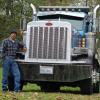
Tell the owner to trade those Petes in and pick up some locally owned, locally sourced Kenworths!  Keep it in the Washington family!

Please sign in to comment

You will be able to leave a comment after signing in

Sign In Now

Account

Navigation

Search

Search

Configure browser push notifications

Chrome (Android)
  1. Tap the lock icon next to the address bar.
  2. Tap Permissions → Notifications.
  3. Adjust your preference.
Chrome (Desktop)
  1. Click the padlock icon in the address bar.
  2. Select Site settings.
  3. Find Notifications and adjust your preference.