December 18, 200421 yr I need to know if they are still legal to ride in the seats in the back of a Brat in California. If not I will not waste my time reinstalling them in my Brat. Any help would be great thanks!
December 18, 200421 yr Yeah, should be, Subaru Brats were MANUFACTURED with those in the bed, so it's all factory stuff. You should have no problems with any laws.
December 18, 200421 yr Must have the seat belts in there, and it would probably be a smart thing to have the head rests also.
December 18, 200421 yr Looks like you're ok to use them. Check the link below, 3rd and 4th items on the list. You might want to print the page and carry it in your vehicle, just in case. http://www.dmv.ca.gov/pubs/hdbk/pgs31thru32.htm
December 18, 200421 yr Author Thanks for the info guys. I have everything I need to put them in (seatbelts, headrests), now just to do it. Thanks again!
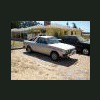
January 26, 200620 yr Author Well, I finally put my seats back in today. I got around to welding the bracket back in. About time! They look so SWEET in the back. One of the guys I work with tried to but it from me today. Not going to happen! Everybody has to stop and take a second glance when I am driving it. That probably has to do with the fact that I have the only Gen 1 Brat around. And I can't remember the last time I saw another one driving around. Kinda cool actually:cool: The 18 year old guy I work with was asking what it was. Funny he did not even know what it was and he had never seen anything like it before. Goes to show you how scarce the old gen of Subies is getting.
January 26, 200620 yr Author Took me almost a year to find my complete set and I ended finding that set in my local junk yard.

Please sign in to comment
You will be able to leave a comment after signing in
Sign In Now