May 20, 200520 yr Just below the rear roof pillar on the old coupes there is a piece of trim like an emblem. It looks like it could have been illuminated. Does anyone know if it was? I'll try to find a picture. Thanks, -Jack
May 20, 200520 yr Author Look below the rear quarter window. Did that thing ever light up? I know there is a similar emblem/trim piece on Lincoln town cars and sometimes you see them illuminated. Just curious.
May 20, 200520 yr A member here in CT is looking for those exact pieces right now. They're just ornamentals,or how you would say it I'm not sure. You may have seen Lincoln emblems lit up but I don't remember seeing Subaru's lit up.Maybe on the experimental GL-100
May 20, 200520 yr Author Is that white plastic opaque? I guess if you could put a small bulb housing back there you would be good to go.
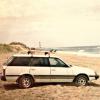
May 20, 200520 yr Actually thats a pic of my coupe...and I am the one looking for those emblems..There were just ornemantal...the one on that picture is actually lacking something..it had a lamination on the center which are gone on mine all thats left is just a chip so I dont really know what went there. Been looking but just cant find a close enough shot to find out for sure.

Please sign in to comment
You will be able to leave a comment after signing in
Sign In Now