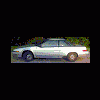
July 14, 200520 yr New member, first post, first time Subaru owner! Hello, My dad just gave me his old 85 Suabru, it looks like this: (Not really mine, I'm just borrowing this pic from elseware on this site, "one eye".) Mine is grey/silver and only says "GL" on the back, nothing on the side. My hubcaps are the same, the roof and hood are without the 'extra openings'. The old registrations say "GLXT". It has a 4 cylinder, 1.8 FI, no turbo, 5 speed. Every picture that looks like it says XT or XT6 (guessing that's a 6 cyl XT). What is the 'proper' name for my car? Is it a GL, XT or the GL version of the XT (XT-GL)???? I need to get some parts like CV boots and a catilytic converter and it's hard to shop without knowing the name. Also how can I determine the paint code so I fix a few "blemishes". Its a fun little car and my dad was nuts about the upkeep. Only 87k miles a couple small spots of rust and a dozen or so small dents, runs great. Thanks in advance
July 14, 200520 yr that is a subaru xt. the gl is kinda like, the spendier package. as for paint code, on my wagon, there is a lil badge on the radiator support. it should say paint number or somting. im pretty sure it should be a 3 digit number. o and welcome to the boards. you will find a lot more about your car sooner.
July 14, 200520 yr Author Thanks for the replies! I just found this: http://www.ultimatesubaru.org/80s/specs/general/1985xtgl.html According to it it is a XT GL based on my VIN. This is a great site. Does anyone have a suggestions for service manuals for this puppy? Lots of pictures here, I'll have to post my own.
July 14, 200520 yr The Xt was offered in 3 trim packages. The base model was the DL. Guess it was fairly rare as I have only seen one. The middle trim package is what you have, the GL. Top of the line was the GL-10. Visit http://www.xt6.net

Please sign in to comment
You will be able to leave a comment after signing in
Sign In Now