August 4, 200520 yr If nothing else, the picture of the car in this article is worth looking at http://autospeed.drive.com.au/cms/article.html?&A=0899 Does anyone have the article in its entirety? What was the Vortex, was the XT down under? This has got to be one of the nicest looking coupes I've ever seen.
August 4, 200520 yr A gen 2 Loyale. Call them Leones in Australia. and the Vortex is an XT, i think the turbo model is a vortex XT... not sure though.
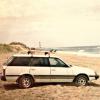
August 4, 200520 yr Its alot like the one I had. Had to drop another engine in it, installed a Weber. Converted it to 5sdp MT and the Enkies finished it off.
August 4, 200520 yr SWEET!! But I think mine is the nicest ....but thats only cause its mine. Here is a pic of my 2 Subies.....ignore the chick in between them...thats just me..nothing to look at.
August 4, 200520 yr that is a nice coupe. the vortex was the xt and the SVX was the XT6 as far as i know.
August 4, 200520 yr Nah, the SVX is the SVX in both countries. Its something you won't miss on the roads. Vast amount of glass and a not so typical Subaru look. I don't think they made it into the double digits in Australia, so you gotta be lucky to see one.

Please sign in to comment
You will be able to leave a comment after signing in
Sign In Now