May 18, 200619 yr Got a 1987 Subaru wagon with standard mainfold exhaust and 2inch system after bolt on, looking at putting extractors on with a cat after the bolt on. Any more power will be givin ? Also has hot dog in middle , sounds nice now, hopefully it will sound better, as at the moment standard exhaust off motor resinates , so any sugestions. thanks
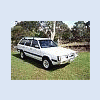
May 20, 200619 yr I made and tried some equal length extractors, they really only changed the note of the exhaust. After some research, i found that to make each extractor pipe the volume of the cylinder that will fill it. With the ea series motors, with each pipe being supplied by 2 cylinders, i made eack pipe 0.9lts. Im back to using the stock exhaust header and a 2" straight through from the cat back. Some pics Gannon
May 20, 200619 yr Thanks jerry Its a shame it didnt work to how i expected it to. Sure it was heaps better than the stock exhaust, but when i went back to stock headers (cos i didnt have a cat converter on the one i built) i noticed no change in power, just the sound it makes. I now have 2.25" from the cat back with a mercury sports muffler and it rocks:headbang:

Please sign in to comment
You will be able to leave a comment after signing in
Sign In Now