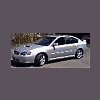
July 12, 200619 yr picked up my fiance's 2.5i LTD Outback sedan today . Very nice ride. I am including a pic of our entire fleet. This includes the 06 OBS, my 05 2.5GT LTD, my bro's(jeep5.9litre) 97 2.5GT LTD and our 86 hatch project. Apparently the 2.5i LTD OB Sedans are pretty hard to come by. I think we got the last 06 in the tri state area (if the dealer websites are anything to go by) ...cant wait to begin the break in process!
July 12, 200619 yr COOL! i never realized the height difference between the gt's and OB's:eek: tell your bro to put on them new fenders! lol
July 12, 200619 yr I had that many Soobs in my driveway at one time, but none of them looked that good Very sexy!
July 12, 200619 yr Author yeah..i love my new ones, but i have a fondness in my heart for the old ea81 & ea82s. we grew up always having one and i would love to get that hatch back on the road. id love to get a nice ea81 D/R wagon to work on after that.
July 12, 200619 yr Author will do bro. thanks for the thought. i am kind of missing the utility of my grand cherokee. i am def looking for something to haul stuff around next to add to my fleet.

Please sign in to comment
You will be able to leave a comment after signing in
Sign In Now