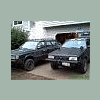
July 13, 200619 yr I work in gorst, wa. and the other day I was too early so i went through bremerton/auto center way area....and i saw a blue lifted EA82 wagon out in front of some sort of shop........ I am just wondering if this is anyone on the message board??
July 13, 200619 yr Probably not mtnman38, as he does not live in Gorst. Assuming that it also had a hood scoop, it was a friend of ScoobyWagon's... don't think the guy is a member but I do think he looks in occasionally. He has an ER27 under the hood.
July 13, 200619 yr Well, he lives pretty darn close to Gorst:cool: And I think he has a lifted blue wagon. But I've been wrong before:rolleyes:
July 14, 200619 yr Author thanks turbone, but mtnman38 is a freind of mine:) .....and yes is does have a hoodscoop............... er27.................that rocks:headbang:

Please sign in to comment
You will be able to leave a comment after signing in
Sign In Now