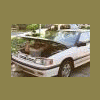
December 30, 200619 yr heres my new foglights. placed sleekly in the grill and grill and lights are renforced with loctight and lockwashers. sure helps those mountain drives! enjoy )ps: sorry for the crappy camara phone pics. )
December 30, 200619 yr awesome! nice job, man. Now just fix that driver's side corner marker, and you're kosher. :-p
December 30, 200619 yr you should do that to an ea81 with the cyclops headlight. you'd look like a UFO coming down the road, haha. and yes, that looks very good. I think I will do that with my DL actually. it looks THAT good.
December 30, 200619 yr awesome! nice job, man. Now just fix that driver's side corner marker, and you're kosher. :-p i agree.
December 30, 200619 yr Author awesome! nice job, man. Now just fix that driver's side corner marker, and you're kosher. :-p ill get around to it eventually. i need to adjust my headlights still and bolt my front bumper on

Please sign in to comment
You will be able to leave a comment after signing in
Sign In Now