Skip to content
View in the app

A better way to browse. Learn more.

Ultimate Subaru Message Board

A full-screen app on your home screen with push notifications, badges and more.

To install this app on iOS and iPadOS
  1. Tap the Share icon in Safari
  2. Scroll the menu and tap Add to Home Screen.
  3. Tap Add in the top-right corner.
To install this app on Android
  1. Tap the 3-dot menu (⋮) in the top-right corner of the browser.
  2. Tap Add to Home screen or Install app.
  3. Confirm by tapping Install.

The Brat went off road!

Featured Replies

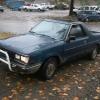
I haven't been on here in forever! Been way to busy working and what not. Started a new job and all. Anyway last night I took the Brat over th Rieter's pit (I live about 5 minutes away from it now) And was pretty impressed what a stock brat can do. I never gave it enough credit. So now I'm ethused and want to do more! I'm thinking about doing a lift on it, what do you guys think? I'm tempted to go ahead and do a custom rear bumper as well.

i got a cheap 3/2 in pk lift for ya...:)


btw i just got a crat too!!!:headbang:


the subaru kid

-Dalton

Oh yeah? Is it complete?


yup


the subaru kid

-Dalton

Please sign in to comment

You will be able to leave a comment after signing in

Sign In Now

Account

Navigation

Search

Search

Configure browser push notifications

Chrome (Android)
  1. Tap the lock icon next to the address bar.
  2. Tap Permissions → Notifications.
  3. Adjust your preference.
Chrome (Desktop)
  1. Click the padlock icon in the address bar.
  2. Select Site settings.
  3. Find Notifications and adjust your preference.