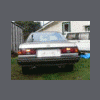
September 29, 200718 yr Ok here goes Look here http://picasaweb.google.com/Busrsq/MySubaruRX11 and You will see my new exhaust and muffler and it also has a LOUD quiet button on dash that operates a butterfly in the exhaust to make it quieter and has more back pressure(only use it in cities), Also the short shifter I took out of my Rally spec car has clearance issues so I will need to rethink it. Next will be a custom intake I am building then Intercooler,Then MORE BBBOOOSSSSTTTT heheheeh then scare WRX's. I also have 2 spare engines one of which is fully forged internals...
September 30, 200718 yr Looks like some fun.. I do like the idea of those exhaust switches. Good for legal when you need it and power when you want it. Have fun
October 3, 200718 yr I have been thinking about doing the butterfly cutout. How does it seal. What brand do you have? Is it electric or mechanical? How long have you had it on. Sorry for all the q's.
October 3, 200718 yr Author I have been thinking about doing the butterfly cutout. How does it seal. What brand do you have? Is it electric or mechanical? How long have you had it on. Sorry for all the q's. I have no idea what brand it is came with the car,it is electric,seals really well,been on about 3 months

Please sign in to comment
You will be able to leave a comment after signing in
Sign In Now